Small courier offices in India sell DHL, FedEx, UPS and Aramex through a supplier who sends rates as Excel files. I designed and built a rate tool that reads those files as they are, compares every carrier at once and keeps the office's margin private.
ProductShipBahi: booking and GST billing for courier offices
FeatureRates: quote, world map, rate sheets
UsersCounter staff and owners of small courier offices
PlatformWeb app, desktop and phone
TimelineOctober 2026
RoleFounder: product, UX and build
↓ Scroll, it starts with a question
Harpreetonline
Hi bhai, how much to send 3 kg to Canada? 📦10:42
Checking, give me a few minutes…10:43
ok 🙏10:43
The short version
A customer asks a price on WhatsApp. The answer was buried in five spreadsheets.
Who
Counter staff at small courier offices
They sell DHL, FedEx, UPS and Aramex shipping abroad. Customers message: "How much to send 3 kg to Canada?"
The problem
Every quote was worked out by hand
Rates arrive as 5 different Excel files from a supplier
DHL Express14 zones · own surcharges · fuel % changes weeklyTo do
FedEx17 zones · demand surcharge in a separate fileTo do
UPS Saver31 zones · remote area list on another websiteTo do
Aramex61 zones · per-kg above 20 kgTo do
The customer is still waiting…
Canada · V5H 2A9 · 3.2 kgEvery carrier, cheapest first
Canada · VancouverSupplier network · Zone 1
Cheapest₹3,311.08
Canada · TorontoSupplier network · Zone 8
₹4,290.48
UPS SaverCanada
₹4,296.83
DHL ExpressZone 9
₹4,986.20
FedExZone L
₹5,712.60
You, by hand0sfor 1 of 5 carriers
ShipBahi< 1sfor all 5, ready to send on WhatsApp
Rates come from a real supplier's sheet; the postcode list is simplified for this demo. This is the problem ShipBahi Rates solves.
02 · Research
What I learned from the first office
I worked alongside an international courier office in Delhi and studied what they use every day: five supplier workbooks, the supplier's formula emails and the carriers' surcharge pages. Every idea was checked against one question: would this work for any courier office?
Finding 1
No two sheets look alike
Zone grids, country columns, notes in the header row, flat prices that turn per-kg halfway down.
Finding 2
The margin is private
Staff show the screen at the counter. Cost and margin must never be seen by customers.
Finding 3
Quotes live on WhatsApp
Customers ask and get answers in chat. A letterhead PDF helps for businesses.
Finding 4
The postcode changes the price
Remote fees, and zones by postcode for Canada, Australia and New Zealand.
Finding 5
Typing numbers is the enemy
"I don't want to manually add the values." Anything in a file should be read, not retyped.
The goalAnswer while the customer is still in the chat.
03 · Principles
Five rules for every screen
01Use the files they already getUpload the supplier's Excel as it is.
02Compare, don't look upEvery carrier at once, cheapest first.
03Cost stays behind the counterOne switch hides cost and margin.
04Warn, don't blockA note for anything unusual; the quote still works.
05One calculator everywhereQuote, PDF, WhatsApp and map always match.
04 · Design decisions
What I built, and why
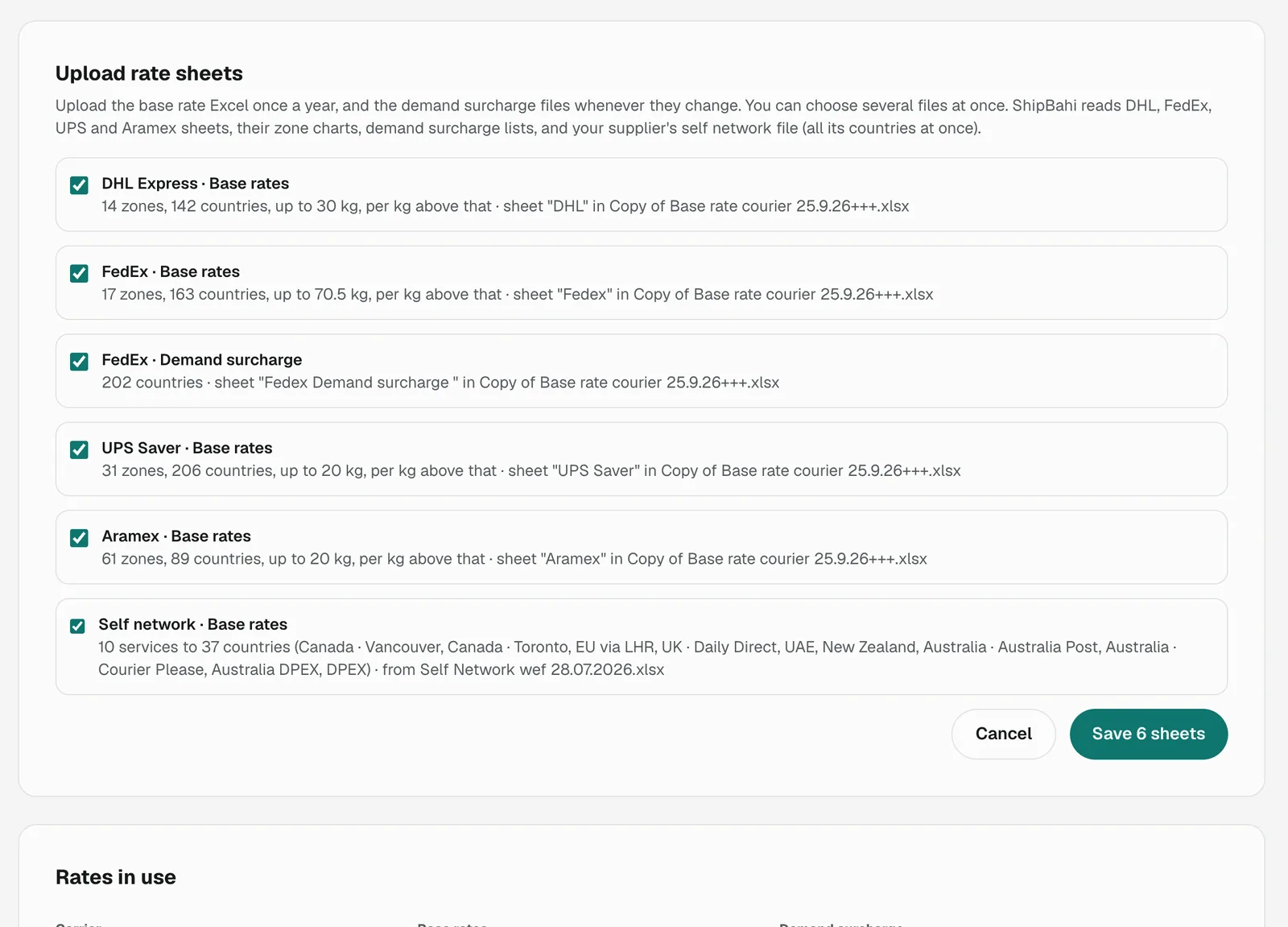
Two files, six rate sheets recognised in one upload.
01
Upload the Excel, see what was understood
ProblemRate cards change yearly, surcharge lists more often. Retyping them is slow and error-prone.
DecisionOne drop zone takes any number of files. ShipBahi recognises each layout, zone chart and demand list and says what it found before saving.
Why"17 zones, 163 countries, up to 70.5 kg" lets the owner check the reading against a sheet they know.
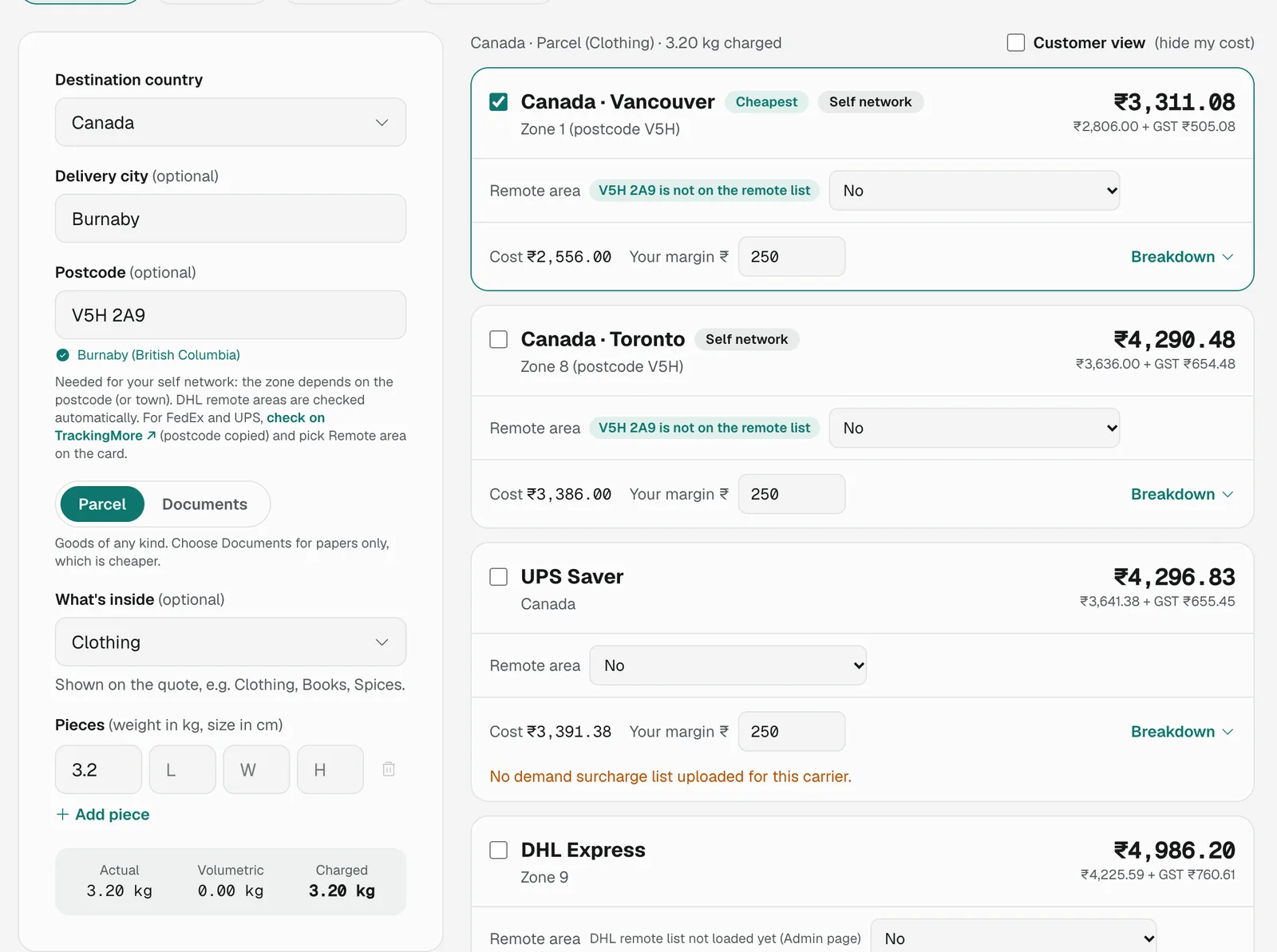
The supplier's own Vancouver service comes out cheapest, priced from the postcode.
02
Every carrier on one screen
ProblemComparing meant working out each carrier separately and remembering the results.
DecisionDestination, postcode and pieces on the left; one card per carrier on the right with the total, GST split, a "Cheapest" badge, a remote-area check and a margin for this quote only.
IterationCards first re-sorted on every change, so a card jumped away while its margin was being edited. Now they keep their order while you work. Try it below ↓
Canada · Vancouver₹3,311
Canada · Toronto₹4,290
UPS Saver₹4,296
Iteration
A card that ran away
While someone typed a bigger margin on Vancouver, its price went up, the list re-sorted, and the card they were editing jumped to another spot. Press Before and After to see the fix: cards now keep a stable order based on the base cost.
Customer viewHide my cost and margin
Canada · VancouverCheapest
Your cost₹2,556.00
Your margin₹250.00
Price before GST₹2,806.00
GST 18%₹505.08
Price to customer₹3,311.08
What the owner sees
03
Show the working, then hide it
ProblemOwners need to trust the maths; customers must never see it.
DecisionA full breakdown on each card for the owner. One remembered "Customer view" switch for the counter. Quotes go out on WhatsApp, as a letterhead PDF or as text: prices, GST and totals only.
Try itFlip the switch. That's the moment a customer leans over the counter.
Try it · type a Canadian postcode
04
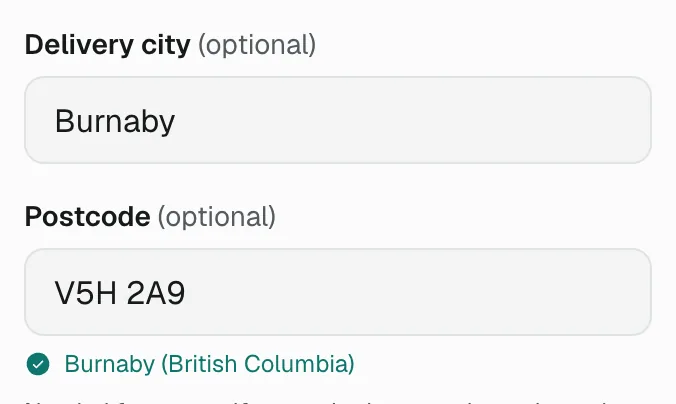
Let the postcode do the work
ProblemRemote fees and postcode zones were checked on other websites, if at all.
DecisionCity and postcode are separate. The postcode is checked against the country's format as you type (all 234 countries), confirmed, and the town filled in. DHL's list of about 108,000 remote postcode ranges is checked automatically.
Edge caseA postcode in two zones is priced at the dearer one, with a hint to add the suburb.
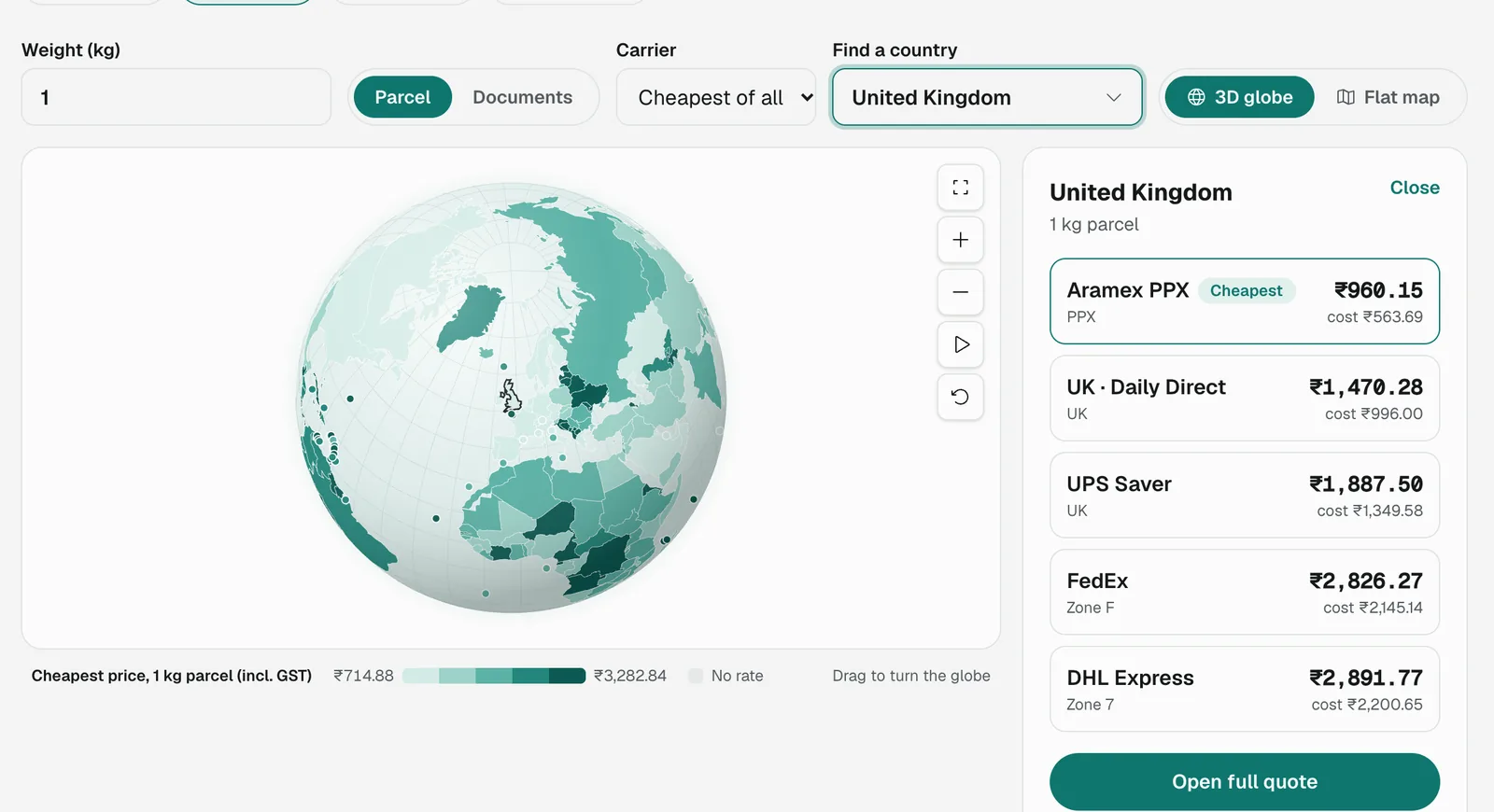
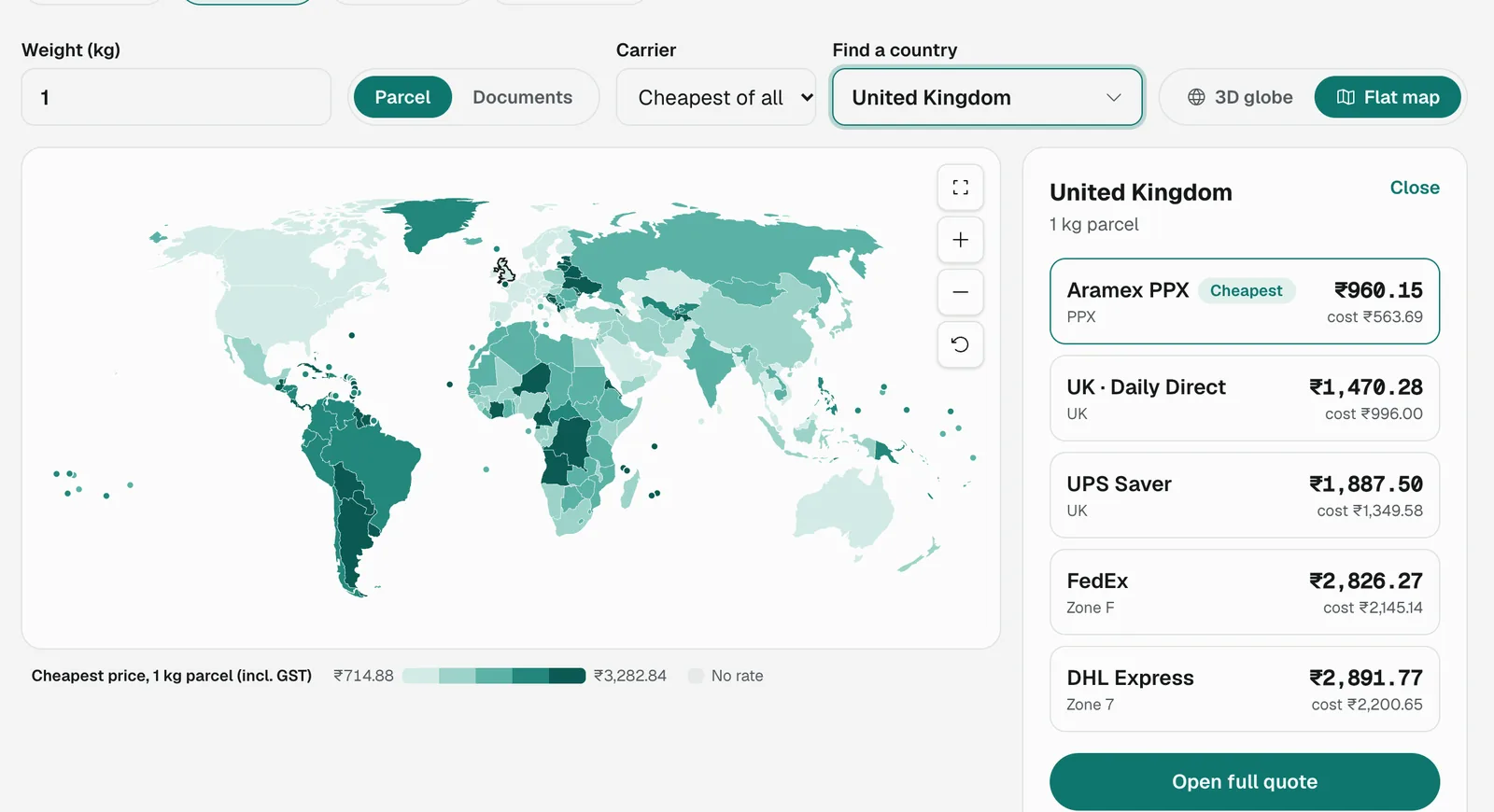
Globe view with the UK selected, and the flat map for scanning the world at once.
05
See the whole world at one weight
ProblemThe quote screen answers one destination at a time. Owners also want to see where they are competitive.
DecisionA World map tab, added without touching the quote screen. One weight shades every country by its cheapest price; hover for each carrier, click for a full quote. A 3D globe turns to any country you search for.
Iteration"Full screen map not working": the reset icon looked like full screen. It now has a real full-screen button and a distinct reset icon.
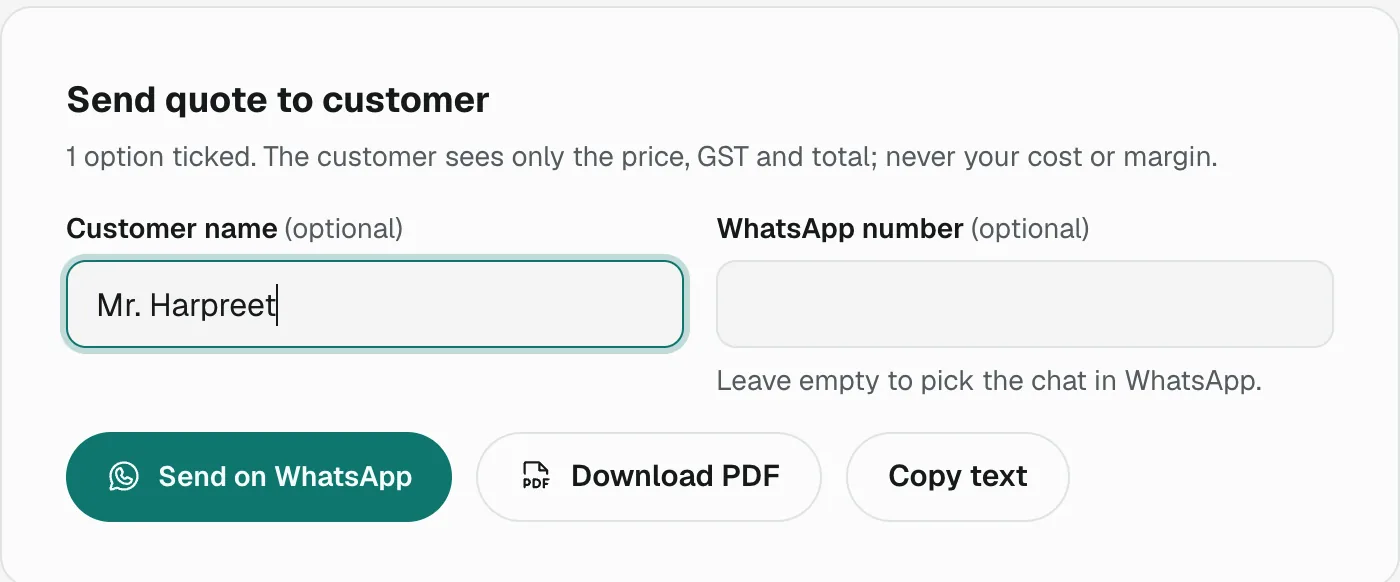
Only the price, GST and total go to the customer, never the cost or margin.
06
Back into the chat
ProblemThe answer had to be typed into WhatsApp by hand, carefully leaving out the cost.
DecisionTick the options to offer, add the customer's name and send. WhatsApp, letterhead PDF or plain text, all from the same calculator.
05 · Iterations
Small frictions the user found
The office used each version on real work. Most fixes were small, and each removed a moment of doubt at the counter.
What the user hitCountry list didn't reopen after choosing
WhyThe browser's built-in list only shows matches for what is typed.
What changedLists that always open with every option and narrow as you type.
What the user hitA DHL card showed the wrong remote charge
WhyCards re-sorted while a dropdown was open.
What changedStable card order based on the base cost.
What the user hit"Remote area code isn't showing automatically"
WhyDHL's official remote list hadn't been loaded yet.
What changedA clear "list not loaded" note; then every postcode is checked.
What the user hit"Full screen map not working"
WhyThe reset icon looked like a full-screen icon.
What changedA real full-screen button and a distinct reset icon.
What the user hitSome countries had no postcode example
WhyFormats covered only common destinations.
What changedFormats for all 234 countries, or "no postcodes".
06 · Outcome
Where it stands
Live for the first office. These figures come from their own files and setup.
0rate sheets read from two Excel files in one upload
0networks side by side: DHL, FedEx, UPS, Aramex and the supplier's own
0self-network countries read from 8 sheets
0DHL remote postcode ranges checked automatically
Trade-off
Fuel % for UPS, FedEx and Aramex is typed by hand
Their sites block automated reading and I don't work around that. DHL's charges are read daily.
Trade-off
Postcode lookups can be incomplete
Complete for about 25 countries; elsewhere "not found" is a warning, never a block.
Measure next
Time to quote, quotes per day, quote to booking
Tracked once there is enough usage to compare against.
The goal was never a prettier spreadsheet. It was answering a customer while they are still in the chat.
Next: book from a quote
Turn an accepted quote into a shipment with receiver and weight filled in.
Next: fuel % that updates itself
A reliable source for every carrier, not just DHL.
Thank you
Screens show sample company data; prices come from a real supplier's rate sheets for illustration.